TIKTORY Desktop App
What the browser
can't do.
The web app covers overlays, flows, and most automations. Install the Windows app when you need to send chat from TIKTORY, control Spotify, simulate keystrokes, play media from disk, or pin the Match Monitor over other windows.
Windows only. A macOS build is not available.
Unlock local
Windows features
Send chat from the dashboard
Post chat messages and run chat commands without jumping back to TikTok Live Studio. Available as a flow action.
Simulate keystrokes
Map gifts and events to keyboard input so viewers can trigger in-game actions on your PC.
Control Spotify
Let viewers queue tracks with !play and !skip, or drive playback from flows. The Spotify overlay widgets work with the app.
Local media cache
Store overlay videos and audio on disk. OBS and TikTok Live Studio play them from localhost instead of waiting on the CDN.
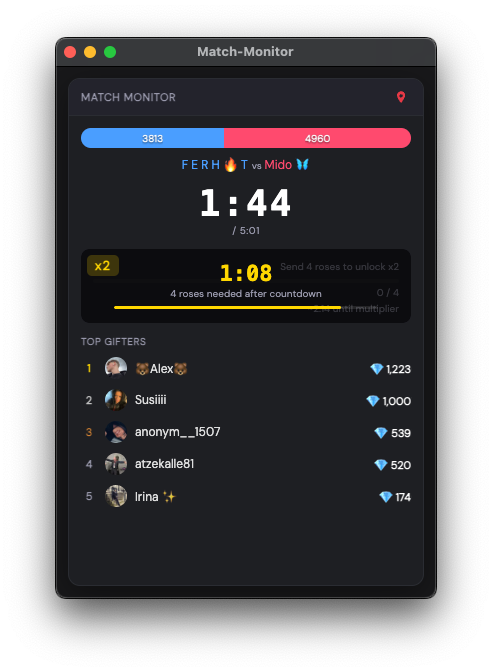
Match Monitor on top
Pop the monitor into its own window and keep it above everything else. See x2 / x3 multipliers up to 30 seconds before TikTok shows them.
Auto-connect when you go live
The app watches your TikTok username and connects as soon as the stream starts, so overlays and flows are ready before the first gift.
Install in three steps
- 01
Download
Get the latest 64-bit Windows installer from this page.
- 02
Run the installer
Open the downloaded .exe and follow the prompts.
- 03
Bypass SmartScreen if it appears
Windows may mark the file as unknown. Click More info, then Run anyway.
Antivirus and SmartScreen
Some antivirus tools flag TIKTORY because the app is not code-signed yet and it can simulate keyboard input. That is expected. The installer from this page is safe.
Download for Windows